> ## Documentation Index
> Fetch the complete documentation index at: https://docs.ascn.ai/llms.txt
> Use this file to discover all available pages before exploring further.
# How the agent works
> Three layers of ASCN Agent: Brain, Tasks, Channels.
Every ASCN Agent is three layers. Understanding them means understanding how to configure an agent for any task.
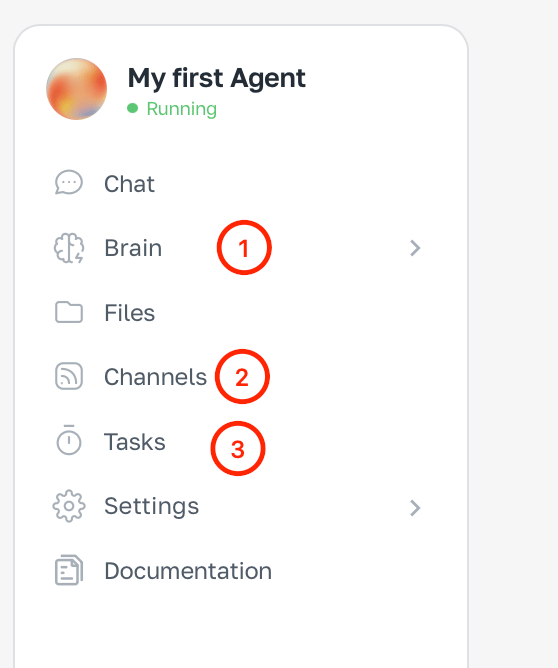
In the side menu you see three key sections: **Brain** (①), **Channels** (②) and **Tasks** (③) — each owns its layer.
 ***
## Brain — the control center
**Brain** defines the agent's personality, knowledge and abilities.
Here you configure:
* **Integrations** — which services the agent can access: Gmail, Google Calendar, Google Drive, Slack, GitHub
* **Skills** — reusable behaviour scripts for typical tasks
* **Knowledge** — who the agent is, how it talks, which files and documents it uses
* **Memory** — what the agent remembers about you between sessions
The Brain is a one-time setup. Once you've connected integrations and filled in knowledge, the agent is ready to work without further instructions.
***
## Tasks — automations
**Tasks** are what the agent does on its own, without you.
Two kinds:
| Type | Example |
| ------------- | ------------------------------------------------ |
| **Scheduled** | Every morning at 8:00 — summary of unread email |
| **Triggered** | New email arrives → agent prepares a draft reply |
Tasks are created in chat — just describe what to do and when.
***
## Channels — where you talk
**Channels** are where you talk to the agent and where it replies.
Available channels:
* **ASCN chat** — web interface of the platform
* **Telegram** — a bot you create via BotFather
* **Slack** — your team workspace
Connect Telegram so you can control the agent and get notifications right in the messenger — without opening a browser.
***
## How the layers work together
**Example: a morning email agent**
1. **Brain** — connected to Gmail and Google Calendar, knows your work style
2. **Tasks** — every day at 8:00 the agent reads your inbox and builds a summary
3. **Channels** — the summary comes to you in Telegram
You wake up and already know what arrived overnight.
***
Start with the Brain — connect your first integration.
***
## Brain — the control center
**Brain** defines the agent's personality, knowledge and abilities.
Here you configure:
* **Integrations** — which services the agent can access: Gmail, Google Calendar, Google Drive, Slack, GitHub
* **Skills** — reusable behaviour scripts for typical tasks
* **Knowledge** — who the agent is, how it talks, which files and documents it uses
* **Memory** — what the agent remembers about you between sessions
The Brain is a one-time setup. Once you've connected integrations and filled in knowledge, the agent is ready to work without further instructions.
***
## Tasks — automations
**Tasks** are what the agent does on its own, without you.
Two kinds:
| Type | Example |
| ------------- | ------------------------------------------------ |
| **Scheduled** | Every morning at 8:00 — summary of unread email |
| **Triggered** | New email arrives → agent prepares a draft reply |
Tasks are created in chat — just describe what to do and when.
***
## Channels — where you talk
**Channels** are where you talk to the agent and where it replies.
Available channels:
* **ASCN chat** — web interface of the platform
* **Telegram** — a bot you create via BotFather
* **Slack** — your team workspace
Connect Telegram so you can control the agent and get notifications right in the messenger — without opening a browser.
***
## How the layers work together
**Example: a morning email agent**
1. **Brain** — connected to Gmail and Google Calendar, knows your work style
2. **Tasks** — every day at 8:00 the agent reads your inbox and builds a summary
3. **Channels** — the summary comes to you in Telegram
You wake up and already know what arrived overnight.
***
Start with the Brain — connect your first integration.