> ## Documentation Index
> Fetch the complete documentation index at: https://docs.ascn.ai/llms.txt
> Use this file to discover all available pages before exploring further.
# Secrets and keys
> Safe storage of tokens and API keys for external services.
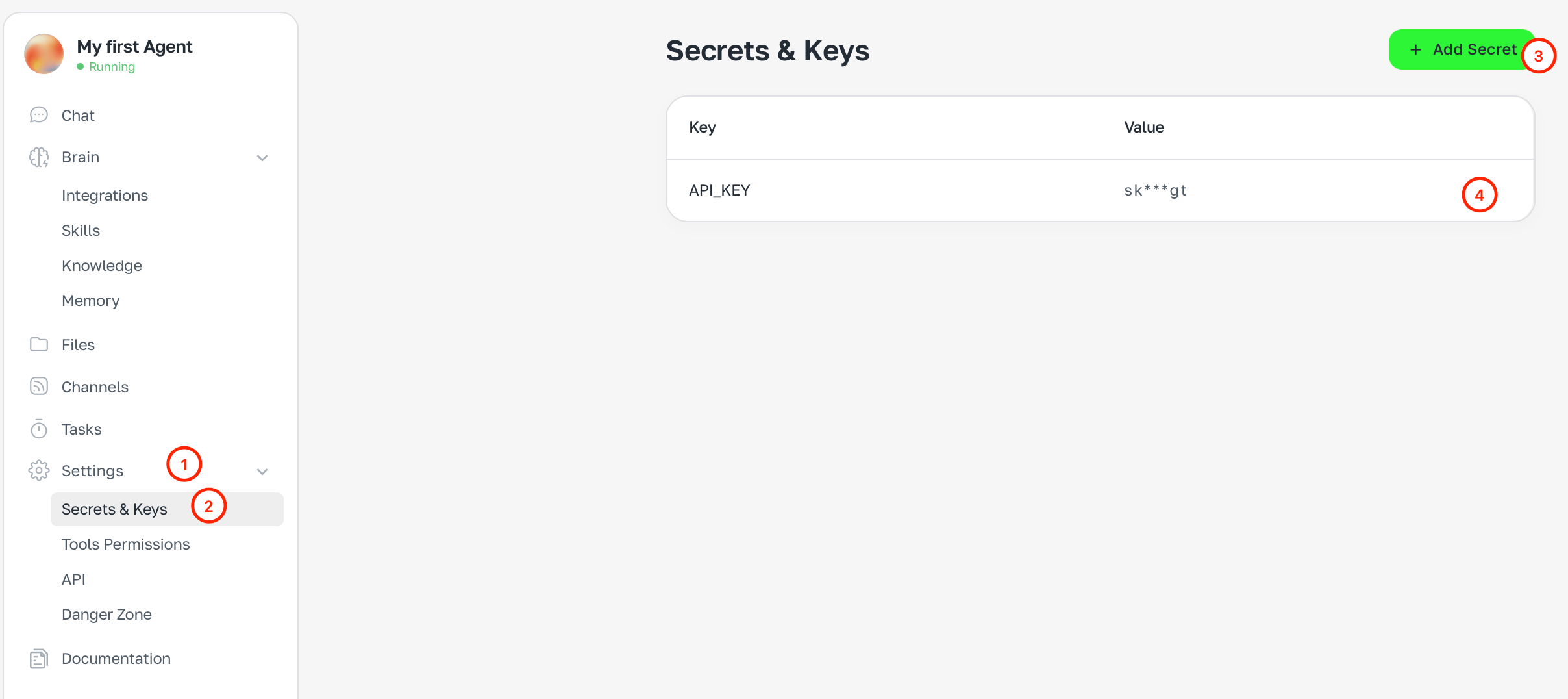
**Secrets** are environment variables for safe storage of tokens, API keys and other credentials. The agent uses them when calling external services, and they are never shown in plain text.
 ## When you need secrets
When connecting your own APIs or services that need auth keys. For example:
* An API key for a third-party service
* A token for a corporate Slack
* Webhook keys
Standard connectors (Gmail, Google Calendar, Slack) authorize via OAuth — you don't need secrets for them.
## How to add a secret
1. Open **Settings → Secrets and keys**
2. Click **+ Add secret**
3. Enter the **name** (e.g. `API_KEY`) and **value**
4. Save
## Security
* Secret values are encrypted and not shown after save
* Secrets don't end up in chat history or logs
* You can delete a secret at any time
## When you need secrets
When connecting your own APIs or services that need auth keys. For example:
* An API key for a third-party service
* A token for a corporate Slack
* Webhook keys
Standard connectors (Gmail, Google Calendar, Slack) authorize via OAuth — you don't need secrets for them.
## How to add a secret
1. Open **Settings → Secrets and keys**
2. Click **+ Add secret**
3. Enter the **name** (e.g. `API_KEY`) and **value**
4. Save
## Security
* Secret values are encrypted and not shown after save
* Secrets don't end up in chat history or logs
* You can delete a secret at any time